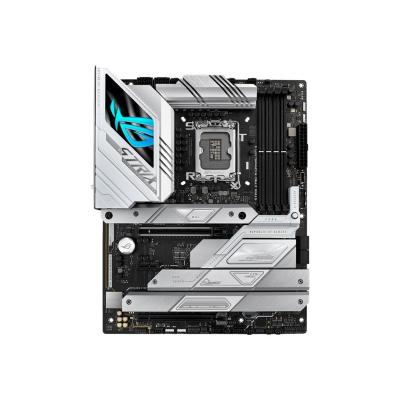
ASUS Mainboard ROG Strix Z790-F Z790F Gaming WIFI II (90MB1FM0-M0EAY0) (90MB1FM0M0EAY0)

ASUS Mainboard ROG Strix Z790-F Z790F Gaming WIFI II (90MB1FM0-M0EAY0) (90MB1FM0M0EAY0)

ASUS ROG STRIX Z790-F GAMING WIFI II - Motherboard - ATX - LGA1700 Socket - Z790 Chipset - USB-C 3.2 Gen 2x2, USB-C 3.2 Gen2, USB 3.2 Gen 2, USB 3.2 Gen 1 - 2.5 Gigabit LAN, Wi-Fi 7, Bluetooth - onboard graphics (CPU required)

Qty:

Category (Mainboards)
PC Components
Motherboards
OEM
90MB1FM0-M0EAY0
EAN
4711387356548
SKU
155604 (155604)
Manufacturer
Asus
Master carton
0.0000
Type
Motherboard
Line
ASUS ROG - Series
Color
Gold
UNSPSC
43201513
eClass
19-03-03-03
eClass V7
19-05-08-90
CPU socket type
Intel Sockel 1700 (Core i)
Form factor
ATX
HDD bus standard
SATA
Other features
UEFI

ROG STRIX Z790-F GAMING WIFI II
The ROG Strix Z790-F II strikes from the shadows with a flurry of advanced power and features to elevate the latest Intel® processors, graphics cards, storage and wireless networking to the next level. Armed with enhanced DDR5 support, ample cooling, PCIe 5.0 and WiFi 7, this high-performance ninja is ready for the toughest of missions.

PCIE® SLOT Q-RELEASE
A physical button unlocks the first PCIe slot’s security latch with one press, greatly simplifying the process of detaching a PCIe card from the motherboard when it’s time to upgrade to a new GPU or other compatible device.

ALL-ROUND PERFORMANCE
Robust power delivery, breakneck DDR5 memory, speedy storage, and comprehensive cooling elevate any build with the ROG Strix Z790-A II at its center.

AI OVERCLOCKING
Tuning is now faster and smarter than ever before. ASUS AI Overclocking profiles the CPU and cooling to predict the optimal configuration and push the system to its limits. Predicted values can be engaged automatically or used as a launching ground for further experimentation.

LEADING CONNECTIVITY
Next-gen connectivity and low-latency networking are hallmarks of the ROG ecosystem, and the Strix Z790-F II delivers both of them in full. Joining them is an advanced audio solution for immersive sound so you can pick out the slightest cues and nuances.

WIFI 7
With Multi-Link Operation (MLO)*, WiFi 7** can outperform WiFi 6E to deliver faster speeds, higher reliability and increased data transfer efficiency.

Intel 2.5G Ethernet
Low-latency gaming, speedy file transfers, and high-resolution video streaming are among the many perks of onboard Intel® 2.5 Gbps Ethernet.

PLAY IN STYLE
Bold aesthetics and Aura Sync RGB controls let the ROG Strix Z790-F II shine in every build.

SOFTWARE UTILITIES
A myriad of ROG-exclusive tools put advanced system tuning and configuration at your fingertips

AI COOLING II
Balance the thermals and acoustics of any build with a single click. A proprietary ASUS algorithm slashes unnecessary noise while running a quick stress test, and then monitors CPU temperatures to dynamically adjust fans to optimal speeds.

DARE TO BE GREEN
We at the Republic of Gamers are on a mission to create a sustainable future where all gamers can flourish on the planet we call home.

Every step counts, and as part of ROG’s commitment to creating a more sustainable future, ROG has begun to utilize post-consumer recycled (PCR) plastic and paper materials certified by the Forest Stewardship Council (FSC™) in the packaging of motherboard.

For those who dare, join us on our journey as we make the world a better place.

INTEL® UNISON™
Our latest ROG and ROG Strix Z790 WiFi 7 motherboards help you unify your tech life with a free 9-month subscription to Intel Unison.

Intel Unison lets you use a compatible tablet as a second display, wirelessly transfer content between your phone, computer and tablet, and to do thing like accessing your smartphone’s picture photos while you’re working from on your PC. You can also keep an eye on your text messages and notifications while you’re working on your PC to stay connected without losing your flow, and you can even make phone calls without touching your phone.

  • Q-Antenna
    With Q-Antenna, attaching a Wi-Fi antenna to your PC is easy and fast. Instead of slowly rotating two fasteners until they finally lock in, they just snap into place. Less hassle and more consistent performance.
  • M.2 Q-Latch
    The innovative Q-Latch makes it easy to install or remove an SSD from an M.2 slot. The design employs a simple locking mechanism to secure the drive, eliminating the need for a traditional screw.
  • PCIE slot Q-release
    A physical button unlocks the first PCIe slot's security latch with one press, greatly simplifying the process of detaching a PCIe card from the motherboard when it's time to upgrade to a new GPU or other compatible device.
  • Q-LED
    The on-board Q-LED troubleshooting lights give PC builders a quick indicator to confirm that key components - CPU, RAM, graphics card, storage devices - are functioning normally during startup. Builders can use the Q-LED feature to correct power delivery issues affecting their motherboard, and it can also alert them when memory modules have not been properly installed - even before attempting to boot a newly built PC.
  • Clear CMOS and BIOS flashback
    The Clear CMOS button quickly resets BIOS settings to factory default. It can also be used to reboot the PC if incorrect BIOS settings have been selected. BIOS FlashBack is a safe and simple way to update BIOS. Just drop the (UEFI) BIOS file onto a FAT32-formatted USB stick, plug it into the USB BIOS FlashBack port, and press the button. Updates can even be performed without having memory or a CPU installed.
  • All-round performance
    Robust power delivery, breakneck DDR5 memory, speedy storage, and comprehensive cooling elevate any build with the ROG Strix Z790-F II at its center.
  • AI Overclocking
    Tuning is faster and smarter than ever before. ASUS AI Overclocking profiles the CPU and cooling to predict the optimal configuration and push the system to its limits. Predicted values can be engaged automatically or used as a launching ground for further experimentation.
  • VRM heatsinks
    Covering the power solution are two thick heatsinks with strategic airflow channels for increased heat dissipation while powering high-performance processors.

Address
Name
Asus
Email
info@asus.com
Website
https://www.asus.com/de/
Street
Harkortstraße 21-23
Postcode
40880
City
Ratingen
Country
DE