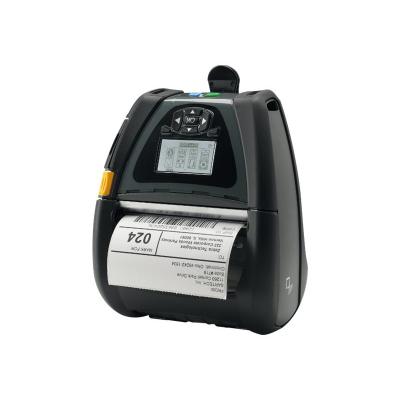
Zebra Printer Drucker QLn420 (QN4-AUNAEM11-00) (QN4AUNAEM1100)

Zebra Printer Drucker QLn420 (QN4-AUNAEM11-00) (QN4AUNAEM1100)

Zebra QLn 420 - Label printer - direct thermal - Roll (11.2 cm) - 203 dpi - up to 102 mm/sec - USB, serial, Wi-Fi(n), NFC, Bluetooth 3.0 - tear bar

Qty:

Category (Drucker)
Printers & Accessories
Printers
OEM
QN4-AUNAEM11-00
EAN
5712505519943
SKU
zepr0000020 (116663)
Manufacturer
Zebra
Master carton
1.0000
Type
Label Printer
Model
QLn 420
UNSPSC
44102405
eClass
19-02-90-02
eClass V7
19-14-01-90
Dimensions (Girth)
220 x 200 x 100 (820)
Printing technology
Label Printer
Maximum printing speed
0.18 ppm - 0.29 ppm
Maximum printing resolution
203dpi

Zebra's user-friendly QLn mobile printers help you print barcode labels and more, wherever and whenever needed. Optimized for high duty-cycle label and receipt printing and designed to enhance business processes through easy integration and operation, the QLn Series printers deliver higher workplace performance. And, with fast processing, large memory and a range of accessories, QLn printers help increase both user and operational efficiencies.

Easy to Integrate and Manage

With Zebra's Link-OS environment, IT staff can manage individual printers or groups of printers remotely via a web browser. With the Profile Manager app, IT staff can expedite initial implementation, automate firmware uploads, resolve issues remotely and eliminate the time it takes to update programming on a printer-by-printer basis. Connect QLn printers to a wired ethernet network via the QLn ethernet to enable easy, remote management.

Easy to Connect

The QLn series offers advanced connectivity options with faster data transfer rates and greater range. Incorporating WLAN (802.11 a/b/g/n dual band) and Bluetooth 3.0, and Near Field Communication (NFC) for Print Touch features, for easy pairing or linking to help pages. To meet the increasing demand for mobile printing from different operating systems, QLn printers are "Made for iPod/iPhone?iPad" certified and also support Android and Windows devices via our Multiplatform SDK apps.

MOBILE A TO Z

From accessories, to supplies, to ZebraCare™ plans.
  • Easier to Integrate
    Move your business forward without the cost or stress of upgrades. Backwards compatibility with QL and QL Plus models lets you upgrade to the QLn printer without changing media or label formats. The inclusion of the legacy CPCL programming language also allows mixed networks of QL/QL Plus and QLn products.
  • Easier to Manage
    Manage all aspects of your networked Link-OS printers from just one screen with Profile Manager. There's no need to switch between applications to get the job done, and you can manage the simple admin console remotely on your PC, tablet or smartphone.
  • Easier to Maintain
    Reduce wasted time and lost productivity with the smart battery, which indicates the power and health of a printer's battery.
  • Easier to Use
    The QLn420 was designed to optimize business processes through easy operation and mobility - reducing training requirements and increasing worker productivity.
  • Longer Printer Uptime
    Improve operational productivity and reduce costs associated with downtime through fewer printing interruptions.

Address
Name
Zebra
Email
contact.emea@zebra.com
Website
https://www.zebra.com/
Street
Ernst-Dietrich-Platz 2
Postcode
40882
City
Ratingen
Country
DE